Tour
MILQ from the inside
Every view on one page, with sample data of a web designer from Bern. No account, no e-mail, no clicking through an unfamiliar interface.
Chapter 1
Record
- 1
See how things stand at a glance
Income, expenses, result — right after logging in. Plus the monthly trend and the largest expense items, so you know where the money goes.
- 2
Upload the receipt, check the entry
Receipt first — MILQ reads amount, date and category and fills them in; you only check. A receipt in euros? Pick the currency, the official FTA daily rate for the booking date is already there, and the entry is booked in francs.
- 3
Every entry stays traceable
The journal shows everything on one timeline — with receipt number, category, VAT rate and, for foreign currencies, the original amount with the rate. Exactly what Swiss record-keeping law requires.
Chapter 2
Bill
- 4
Define hourly rates and products
Whatever you bill again and again is entered once. When writing an invoice you pick it instead of typing description and price every time.
- 5
Log time, bill time
Date, customer, service, duration — select entries and put them on an invoice with one click, one line per entry. Billed entries are locked; open ones show as a total at the top.
- 6
Invoices, quotes, credit notes
Open items at a glance, with partial payments and reminder status. The invoice goes out by e-mail in the customer’s language; overdue ones you chase with a click. Quotes convert into invoices, and paid invoices are reversed with a credit note.
- 7
Your design — and what the customer receives
Logo, font, accent colour, footer: the sample invoice shows every change instantly. Below it, the result — a Swiss QR-bill with receipt and payment part that every bank can read. With a QR-IBAN you get the structured reference too.
Invoices · Invoice designTypeface
InterAccent colour
#1f5f8bPosition
Left · NormalTable
ZebraFooter
E-mailPhoneWebsiteVAT number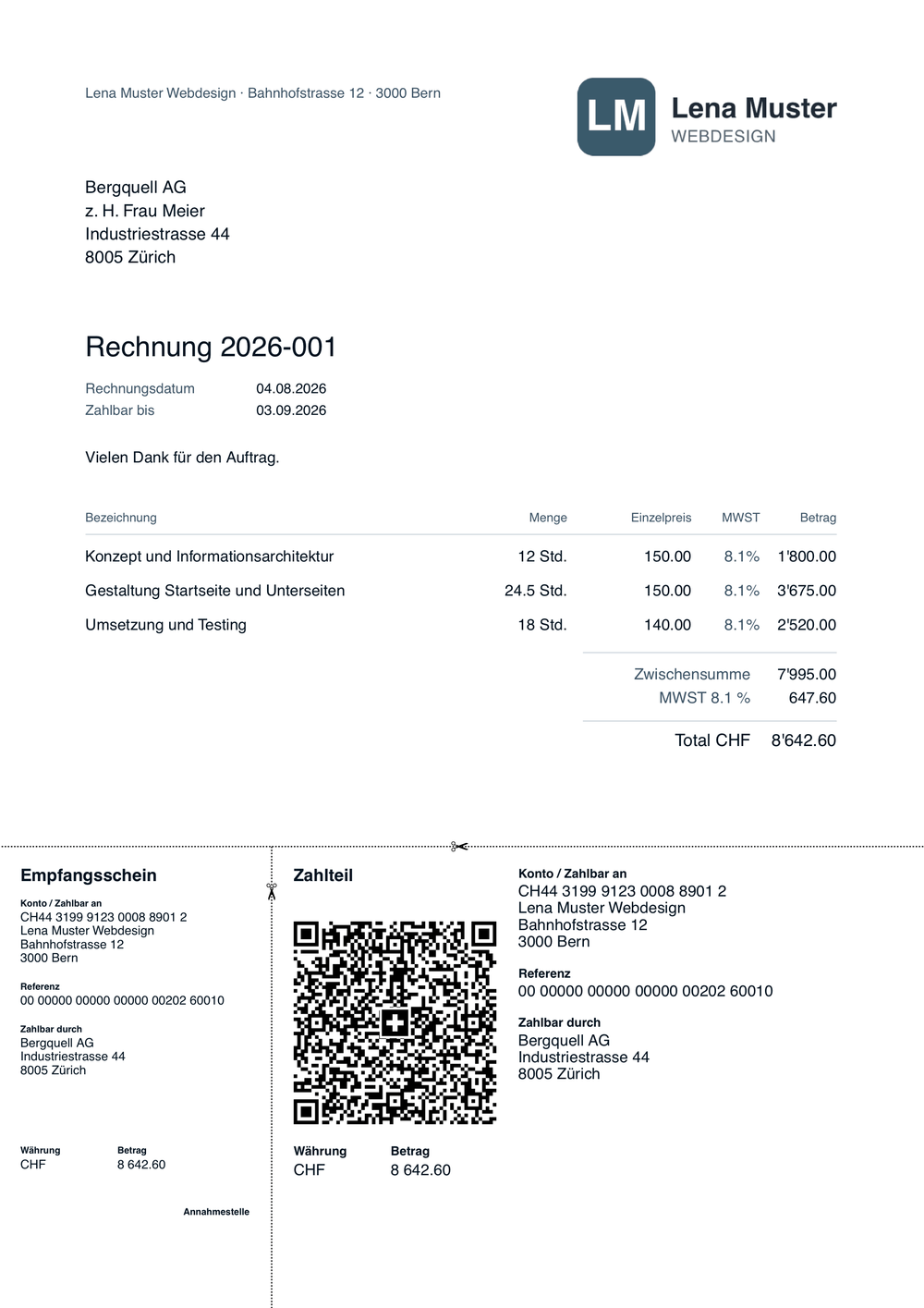
Sample invoice with fictional company and customer data. Not a mock-up — this is the PDF MILQ produces.

Chapter 3
Close
- 8
File VAT like on the form
MILQ extracts the tax from every entry and shows the figures in the same layout as the official FTA form — net tax rate or effective method. Submitted periods are frozen; if a receipt turns up later, MILQ shows the difference.
- 9
Generate the year-end
One click for the income statement, one for the complete journal, one for the receipt archive. Ready for the tax return or your accountant.
- 10
Work together — with your team or accountant
Invite team members or your accountant by e-mail, as owner or team member. If you look after several companies, you switch with one click — each with its own books, one login. The change log records who did what.
- 11
Settings that stay out of the way
Company and personal separated; bank details and design where the invoice is made. Add-on features — AI receipt reading, foreign currencies, time tracking — are switched on under “Features”, taking effect immediately.
Try it yourself
30 days with your own numbers, no credit card and no automatic renewal. Afterwards, continue with a subscription — or for free with QR invoices.
No credit card, no automatic renewal.